
 By Rehan
Disclaimer: This is an independent, unofficial website and is not affiliated with any official organization. The only official website is calcsolveronline.com. Before taking any action or relying on any information provided here, please verify it directly on the official CalcSolver Online website.
CalcSolver is a free calc solver online that solves everyday and advanced math in seconds — no sign-up, no download and no payment, ever. Type your problem, press equals, and get an accurate answer with a live preview while you type. But this calculator has a secret most visitors never notice: turn on Code Mode, enter the calc solver 4 digit code 0000, and the calculator opens a full-screen dashboard of hidden games that you can play instantly in your browser.
So CalcSolver works on two levels. On the surface, it is a clean, fast scientific calculator for homework, exams, office work and quick daily calculations. Underneath, it is a small arcade in disguise — every game in the library has its own permanent 4-digit code, and anyone who knows the code can jump straight from a math problem into that game. This page explains everything: how the calculator works, how calc solver math functions are organised, what the codes mean, whether you need a calc solver password (you do not), whether there is a CalcSolver app, and the honest answer to the question people ask most after the calculator itself — is CalcSolver safe?
Quick answer: CalcSolver is a 100% free online calculator. There is no password and no account. Switch on Code Mode on the calculator below, type 0000 to open the full game library, or type any game’s own 4-digit code (starting from 1000) and press = to play that game directly. Games load from GameMonetize and run in your browser — nothing installs on your device.
CalcSolver
Scientific Calculator
No calculations yet.
Code Mode is on — type a 4-digit code and press =
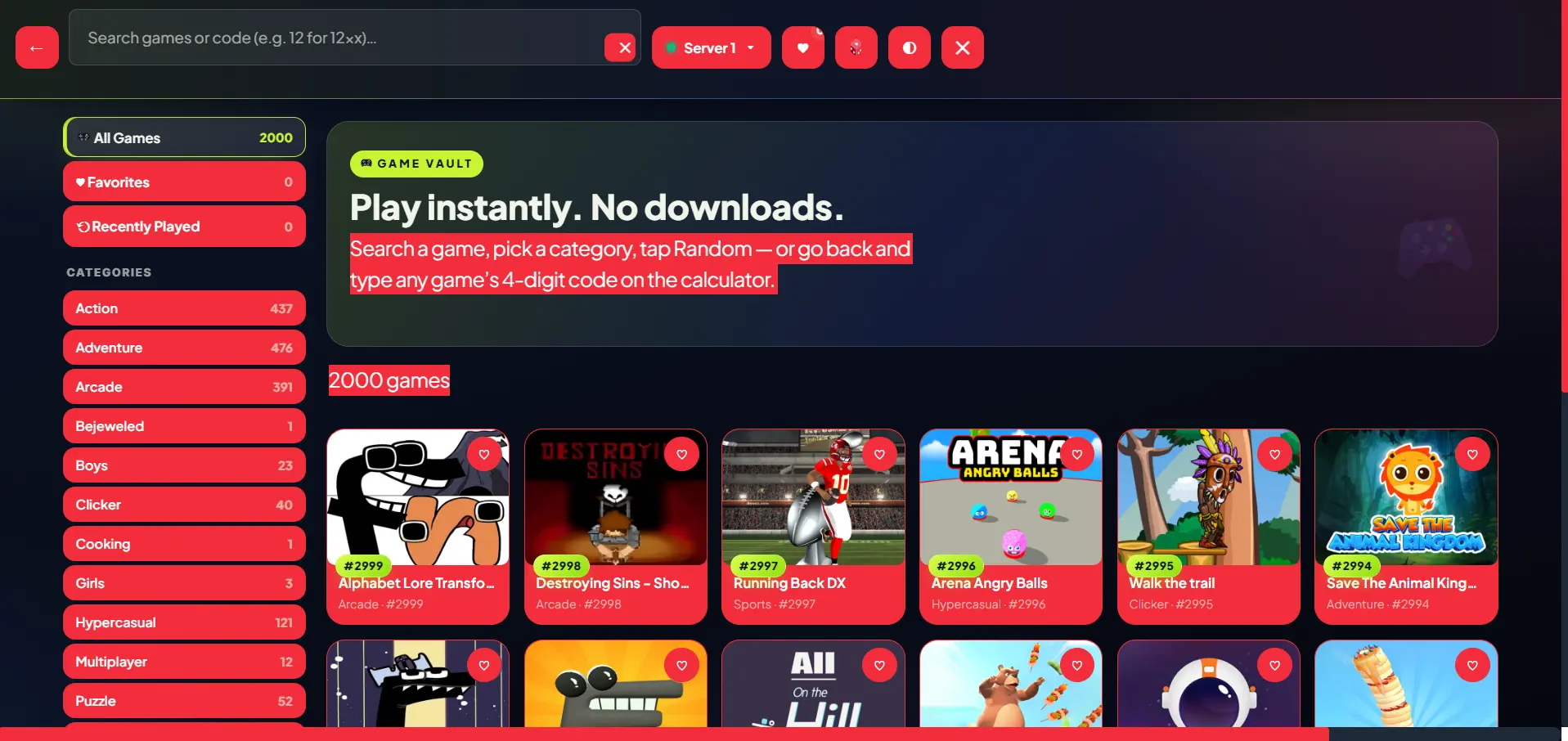
Search a game, pick a category, tap Random — or go back and type any game’s 4-digit code on the calculator.
Continue Playing
Recently Played
Favorites
More like this
What Is CalcSolver?
CalcSolver is an online calculation platform built for students, teachers and professionals who want correct answers without opening a heavy app or carrying a physical calculator. The calc solver online runs entirely in your web browser, which means it works the same way on a phone, a tablet, a laptop or a school Chromebook. There is nothing to install and nothing to update — open the page and the calculator is ready.
Unlike a basic four-function calculator, CalcSolver is a full scientific calculator. It handles the arithmetic you use every day — addition, subtraction, multiplication and division — and the advanced work you meet in class and in engineering: trigonometry, logarithms, powers, roots, factorials and percentages. The engine follows the real rules of mathematics, including the order of operations, so an expression like 2 + 3 × 4 gives 14, not 20, and tricky cases such as −3² and (−3)² are handled correctly instead of being guessed.
What makes this calc solver different from the hundreds of others is the second layer: Code Mode and the hidden games library. Most calculator websites do one job. CalcSolver does the serious job first — accurate math — and then rewards curiosity. That combination is exactly why people search for it by so many different names: some come for calc solver math help, some come for the 4 digit code, and some come back every day just for the games.
CalcSolver 2: The New Generation of the Calculator
The version of the tool on this page is CalcSolver 2 — the second generation of the calculator, rebuilt with a faster engine, a cleaner glass design and a far better game dashboard. If you used the earlier version, everything you knew still works exactly the same way: the same layout, the same Code Mode switch and the same codes. What changed is how it feels.
In CalcSolver 2, the calculator sits in a compact animated card with a glowing gradient border, the display shows a live result preview as you type, and the keypad responds with springy, tactile key presses. The game library — the Vault — is now a proper full-screen dashboard with an animated background, a search bar that understands game codes, a server menu, category browsing, favourites and a proper game player that starts with a splash screen and a big Play button, just like a real game portal. The upgrade changed the experience, not the rules: your codes did not move, and 0000 still opens everything.
Real Math Engine
A true expression parser — not a guesser. Correct order of operations, up to 12 significant figures, and no floating-point junk like 0.30000000004.
Code Mode
One switch turns the calculator into a keypad for the games library. Every game owns a permanent 4-digit code, starting from 1000.
Hidden Games
Type 0000 and a full-screen game dashboard opens: search, categories, favourites, recently played and a random game button.
Instant & Free
No loading screens, no accounts, no paywall. The calc solver is free for every calculation and every game, on any device.
How to Use the Calc Solver Online
Using CalcSolver takes seconds, whether you are solving a percentage problem or opening a game. Here is the complete routine:
- Do your math. Tap or type your expression on the calculator above. Use the scientific row for functions like sin, cos, log or √, switch between DEG and RAD for angles, and watch the live preview under the display — it shows the result before you even press equals.
- Press = for the final answer. The result is added to your history panel (tap the ⟲ icon), so you can reuse any of your last 50 calculations with one tap. The copy button copies the answer to your clipboard.
- Turn on Code Mode when you want the fun part. Flip the Code Mode switch at the top of the calculator. The keypad now accepts game codes instead of math.
- Enter a 4-digit code. Type 0000 and the full games library opens immediately. Or type a specific game’s code — for example the code shown on any game’s card in the library — and press = to jump straight into that game.
- Play. The game opens on a splash screen. Press Play, wait a moment for the game to load, and play in the browser. Use the fullscreen button for the full experience, and the heart icon to save the game to your favourites.
Keyboard users get the full experience too: numbers, operators, Enter for equals, Backspace to delete and Escape to clear all work without touching the mouse. On a phone, the keypad is sized for thumbs, and the whole tool — calculator and games alike — works in portrait mode.
Calc Solver Math: Every Function, Explained Simply
The heart of the site is calc solver math, so it is worth knowing what every button actually does. CalcSolver groups its functions the way teachers teach them, which makes the calculator easy to learn even if you are meeting some of these ideas for the first time.
| Function Group | Buttons | What It Is Used For |
|---|---|---|
| Basic arithmetic | + − × ÷, brackets, % | Everyday sums, bills, discounts, splitting costs, exam arithmetic |
| Powers & roots | x², x³, xʸ, √, ∛ | Areas and volumes, growth problems, physics and engineering formulas |
| Trigonometry | sin, cos, tan + inverses | Angles, triangles, waves — calculated in degrees (DEG) or radians (RAD) |
| Logarithms | log (base 10), ln (natural) | Exponents in reverse: pH, decibels, compound growth, scale problems |
| Constants | π (pi), e (Euler’s number) | Circles, exponential growth and the formulas built around them |
| Special functions | x! factorial, 1/x reciprocal | Probability and combinations (factorial), rates and ratios (reciprocal) |
| Memory & answer | MC, MR, M+, M−, ANS | Multi-step problems where one result feeds the next calculation |
A few honest details matter here. CalcSolver shows results with up to 12 significant figures and cleans up floating-point noise, so 0.1 + 0.2 displays as exactly 0.3. Errors are explained in plain words — “Can’t divide by zero” or “Check the brackets” — instead of leaving you with a silent failure or a confusing NaN. And because the preview updates live, you can catch a typing mistake before it becomes a wrong answer in your homework.
Percentages deserve a special mention because they are the most common real-world use of any calc solver. The % key works the way people expect: type 250 − 15% and you get the discounted price, not a maths lecture. Students use the same tool for algebra practice, teachers use it to check worked examples in front of a class, and professionals use it for quick estimations — invoices, measurements, conversions of scale — where opening a spreadsheet would be overkill.
Code Mode: The Hidden Side of CalcSolver
Code Mode is the feature that turns a normal visit into a discovery. At the top of the calculator there is a small switch labelled Code Mode. Leave it off and CalcSolver is a pure scientific calculator. Turn it on and the calculator quietly becomes a keypad for something else entirely: the games library hidden inside the site.
The idea is simple and a little playful. A calculator is one of the few tools that is welcome almost everywhere — in classrooms, in offices, during study time. Code Mode keeps the calculator fully functional and fully honest as a math tool, while giving anyone who knows the secret a fast, discreet doorway into a library of browser games. There is no separate games page to bookmark and no app to hide. There is just a code.
Code Mode also explains the searches you may have seen people make. Queries like “calc solver 4 digit code” and “calc solver password” exploded because the code feels like a password — a short secret number that unlocks something hidden. It works in a similar spirit, but as the next sections explain, it is not a password at all, and understanding the difference will save you from every scam version of this idea that floats around the internet.
The Calc Solver 4 Digit Code, Explained Properly
Every game in the CalcSolver library owns exactly one calc solver 4 digit code. Codes are assigned in the order games are added to the library, starting from 1000, and a game’s code never changes afterwards. If a game is code 1042 today, it is code 1042 next month and next year. That permanence is the whole point: codes can be shared between friends, written in a notebook or memorised, and they keep working.
| Code | What It Opens | How to Use It |
|---|---|---|
| 0000 | The full games library (the Vault dashboard) | Code Mode ON → type 0000 → the library opens instantly, no = needed |
| 1000 + | One specific game per code | Code Mode ON → type the game’s code → press = → the game opens |
| Partial code | Search inside the library | In the library search box, typing “12” finds every game whose code starts with 12 (the 12xx range) |
To open a specific game directly from the calculator, follow the same rhythm every time: switch Code Mode on, type the four digits carefully, and press the equals key. The calculator checks the code against the library. If the code matches a game, that game’s splash screen opens. If the code does not exist, CalcSolver tells you the code is unknown instead of guessing — a small detail that prevents a lot of frustration when a digit is typed wrong.
Where do you find a game’s code in the first place? Inside the library. Open the Vault with 0000 once, browse or search for a game you like, and look at the badge on its card — every card shows its code, like #1042. Note the codes of your favourites, and from then on you never need to browse at all: calculator, Code Mode, code, equals, play. It takes under five seconds.
Remember it this way: 0000 is the master code that opens the whole library. Codes from 1000 upwards each open one game. There is no other master code, no VIP code and no premium code — anyone selling or “leaking” special CalcSolver codes is inventing them.
Hidden Games: Inside the Full-Screen Dashboard
The moment you type 0000, the calculator gives way to the Vault — a full-screen games dashboard that covers the whole window, designed like a small game portal. The hidden games are real, complete HTML5 games supplied through GameMonetize, the same kind of instant-play browser games found on major game portals: racing, puzzle, arcade, sports, .io, shooting, strategy, dress-up, and dozens of other categories, with new titles added as the feed updates.
The dashboard is organised so a big library never feels big and messy:
Search by Name or Code
Search a title, or search by code prefix — “12” instantly filters to every 12xx game. The fastest way back to a game you played before.
Categories Sidebar
Every category from the games feed, with live counts. All Games, Favourites and Recently Played sit at the top for one-tap access.
Change Server
The Server menu (Server 1, 2 and 3) shows the same catalogue three ways — the full catalog, the popular view and the A–Z archive.
Random Game
One tap picks a game for you. It is the best way to discover titles you would never have searched for on purpose.
Favourites
Tap the heart on any game to save it. Favourites, Recently Played and Continue Playing shelves remember your games in your own browser.
Splash Player
Games open on a splash screen with their artwork and a big Play button — the game itself only loads when you press Play.
A few honest technical notes about the games. They are not downloaded and they are not hosted as copies on this site: each game plays in its original GameMonetize embed, inside the player, which means the game you play is the publisher’s own version, ads and all — the way the game’s creator intended and gets paid for. Because the games stream in the browser, you need an internet connection to play, and big 3D titles naturally load slower on weak connections than small puzzle games. Your favourites and recently played lists are stored only in your own browser’s local storage; clear your browser data and those lists reset, but your codes keep working forever.
The catalogue is large — thousands of games arrive through the feed over time — and it stays fresh through automatic syncing. When new games are imported, they receive the next free codes in sequence. Old games are never renumbered to make room, which is why a code you shared with a friend last semester still opens the same game today.
Calc Solver Password: Do You Actually Need One?
No. There is no calc solver password, and there never has been. CalcSolver asks for no account, no email, no username and no password — not for the calculator and not for the games. If any website, video or message asks you to enter a password, create an account or “verify” yourself to use CalcSolver or to unlock its games, it is not this CalcSolver, and you should close it.
So why do thousands of people search for a password — including searches like “calcsolver net password“? Because the 4-digit code behaves like one. It is a short secret that unlocks a hidden feature, so people naturally reach for the word “password” when they describe it or search for it. The thing they are actually looking for is the library code, 0000, and the game codes from 1000 upwards. When you see “password” in a CalcSolver context, translate it in your head to “code” and everything makes sense.
There is an important safety difference between the two ideas. A password protects something private and must be kept secret. A CalcSolver code protects nothing private — it is a shortcut, shared openly on this page, and typing it can never give anyone access to your accounts, your files or your device. You can share codes freely. Just never let the habit of “typing a code to unlock something” train you to type real passwords into random unlock pages elsewhere. That distinction is the whole lesson.
Is CalcSolver Safe?
Yes — is CalcSolver safe is a fair question with a checkable answer. CalcSolver is safe to use for three concrete reasons, and you do not have to take anyone’s word for any of them.
First, it collects nothing. The calculator runs in your browser. Your calculations, your history, your favourites and your recently played games are stored in your own browser’s local storage on your own device — they are not sent to an account, because there are no accounts. There is no sign-up form because there is nothing to sign up for.
Second, nothing installs. The tool is a web page and the games are browser games streamed in an embedded player. CalcSolver never asks you to download an APK, an EXE, a browser extension or a “helper” file. That single fact removes the entire category of risk that comes with modified game files and unofficial app stores. If a site offering “CalcSolver” ever pushes a download at you, that is your signal that you are on the wrong site.
Third, the games are the publishers’ originals. Games play from their original GameMonetize embeds, unmodified. GameMonetize is an established HTML5 games platform whose titles run in sandboxed browser frames across thousands of websites. The games cannot reach your files, and closing the tab closes everything.
Sensible habits still apply, as they do everywhere online: use the real site (check the address in your browser), keep your browser updated, and remember that games contain the platform’s own advertising — that is how free games stay free. Parents and teachers should know the library is a general games catalogue, so younger children should browse it with the same supervision they would get on any games portal.
CalcSolver App: Do You Need to Download Anything?
There is no separate CalcSolver app to download — and that is deliberate. The website is built to work like an app: it loads fast, fits phone screens properly, remembers your favourites and recent games, and runs the calculator and the full games dashboard in the same place. An app download would add risk and friction without adding a single feature.
If you want CalcSolver to feel like an app, give it an icon on your home screen. It takes ten seconds:
- On Android (Chrome): open this page, tap the ⋮ menu, and choose “Add to Home screen”. CalcSolver now sits with your apps and opens in one tap.
- On iPhone (Safari): open this page, tap the Share button, and choose “Add to Home Screen”. Same result — an icon, one tap, straight into the calculator.
- On a computer: bookmark the page (Ctrl+D or Cmd+D). Because nothing needs installing, a bookmark is the whole “installation”.
Be careful with lookalikes. App stores and APK sites sometimes carry unofficial apps using calculator-and-games names, and those files are not published by this site and cannot be vouched for. The genuine CalcSolver lives in your browser at the address you are reading now. If it asks for a download, it is an impostor.
Finding the Real CalcSolver Net Website
Because the name is short and popular, people type it in a dozen different ways, and the variations fill search suggestions: calcsolver net, calcsolver net website and website calcsolver net are all the same person looking for the same thing — the CalcSolver website. Fast typing creates even shorter cousins, and searches like calcsolver nety, calcsolver ner and calcsolver nt are simply misspellings of “net” by people in a hurry. Search engines usually forgive the typo and show the right result anyway.
Two practical tips will always land you in the right place. First, read the address before you type anything into a page: the real tool is the one where the calculator works immediately, asks for no password and offers no downloads. Second, once you have found the real site, bookmark it or add it to your home screen as described above — then you never have to type the name again, and no typo or lookalike can redirect your visit.
It is also worth knowing what the real site will never do. It will never charge for a code, never sell a “premium password”, never require a login to open the games, and never claim that the library is about to expire unless you pay. Those tricks belong to copycat pages trading on the name.
CalcSolver Not Working? Quick Fixes That Solve Almost Everything
If you ever hit a “calcsolver not working” moment — the calculator not responding, a code doing nothing, or a game stuck on a loading screen — it is almost always one of a handful of simple causes. Work through this list in order; most people are fixed by step two.
- Check Code Mode is actually on. The most common issue by far: typing 0000 with Code Mode off just enters the number 0 into a calculation. Flip the Code Mode switch first, watch for the hint line under the keypad, then type the code.
- Hard-refresh the page. Press Ctrl+F5 (Windows) or Cmd+Shift+R (Mac), or close and reopen the tab on mobile. Sites like this are cached aggressively for speed, and a stale cached copy can show an older version of the tool after an update.
- Type the code slowly and completely. Codes are exactly four digits. For a specific game, remember the equals key is required after the code; 0000 is the only code that opens on its own.
- Give games a moment — and check your connection. Games stream from GameMonetize, so a game cannot start offline. Small puzzle games load in seconds; large 3D games on a slow connection can take noticeably longer. If one game stalls, try a smaller game to test whether the connection or the title is the problem.
- Turn off aggressive blockers for the page. Some privacy extensions and school or office network filters block game embeds or the scripts the calculator runs on. If the calculator area is completely blank, a blocker or network filter is the usual reason — try the page in a different browser or on a home connection to confirm.
- Update your browser. CalcSolver uses standard modern web features. A very old browser may render the tool but fail on newer games. Chrome, Edge, Firefox and Safari, kept up to date, all run it well.
If the calculator works but a single specific game will not load while others do, the problem is with that one title’s embed, not with CalcSolver or your device — pick another game with the Random button and come back to the stubborn one later.
CalcSolver vs. a Normal Calculator
| Feature | CalcSolver | Typical Calculator App / Physical Calculator |
|---|---|---|
| Price | Calc solver free — completely free, no ads in the calculator itself | Free apps often paywall scientific functions; physical units cost money |
| Scientific functions | Full set: trig, logs, powers, roots, factorial, memory | Only on scientific models; basic models stop at + − × ÷ |
| History | Last 50 calculations, tap to reuse, one-tap copy | Usually the last answer only, or nothing |
| Live preview | Result updates while you type | Rare — you find mistakes only after pressing equals |
| Works on | Any device with a browser — phone, tablet, laptop, Chromebook | One device, or one app store account |
| Installation | None — open the page | App install or carrying a physical unit |
| Hidden games | Yes — Code Mode, code 0000, a full games dashboard | No (the famous physical-calculator game tricks are long gone) |
The honest summary: for an exam hall where devices are banned, a physical scientific calculator is still the right tool, and CalcSolver does not pretend otherwise. For everything else — homework at the kitchen table, checking a bill, a quick trig problem at work, and definitely for a five-minute game break — the online tool is faster to reach, easier to read and considerably more fun.
Who Uses CalcSolver Every Day?
Students are the biggest group. Calc solver math covers the exact ground of school and early university courses — algebra, trigonometry, logarithms, percentages — and the live preview plus history make it a genuine study aid rather than just an answer machine, because you can see where a long expression went wrong. The games, of course, are the reward after the homework is done, and Code Mode’s five-second doorway is why the site spreads through classrooms by word of mouth.
Teachers use CalcSolver on classroom screens to verify worked examples live, without installing software on school machines — a real concern on locked-down school networks, where a website that simply works is gold. Several of the troubleshooting steps above exist precisely because school filters are the most common reason the tool appears blocked.
Professionals and everyone else use it for the unglamorous math of daily life: percentages off a price, splitting a bill with a tip, checking an invoice total, converting a measurement, estimating materials for a repair. None of that needs a spreadsheet, and all of it is faster here. That mix — serious utility by day, hidden arcade one code away — is the entire idea of CalcSolver in one sentence.
Frequently Asked Questions
What is the CalcSolver 4-digit code?
The master code is 0000: turn on Code Mode on the calculator, type 0000, and the full hidden games library opens immediately. Every individual game also has its own permanent 4-digit code starting from 1000 — type that code in Code Mode and press = to open that specific game directly.
Is there a CalcSolver password?
No. There is no calc solver password, no account and no login of any kind. People use the word “password” because the 4-digit code feels like one, but the code is a public shortcut, not a secret credential. Any page asking you for a real password to use CalcSolver or unlock games is a fake — close it.
Is CalcSolver safe to use?
Yes. CalcSolver runs entirely in your browser, collects no sign-ups or personal details, and asks for no downloads or installations. Its games are the publishers’ original GameMonetize embeds, played unmodified in a browser frame. Your history, favourites and recent games stay in your own browser’s local storage.
Is CalcSolver really free?
Yes — calc solver free means the whole thing: every calculator function, Code Mode, the full games library and every game code, with no premium tier and no payment. The games platform carries its own advertising inside games, which is how the game creators get paid.
Is there a CalcSolver app I should download?
No download is needed or offered. The CalcSolver website works like an app on phones, tablets and computers. For one-tap access, use your browser’s “Add to Home Screen” option. Be wary of unofficial APKs using similar names — they are not published by this site.
What is CalcSolver 2?
CalcSolver 2 is the current, second-generation version of the tool: a faster math engine, a redesigned animated calculator card, and a full-screen game dashboard with search, categories, a server menu, favourites and a splash-screen player. All original codes, including 0000, work exactly as before.
Why is CalcSolver not working for me?
Usually one of three things: Code Mode is not switched on before typing a code, your browser is showing an old cached copy (hard-refresh with Ctrl+F5), or a network filter or browser extension is blocking the game embeds. The troubleshooting section above walks through every common cause in order.
How many games are hidden in CalcSolver?
The library is fed by the GameMonetize catalogue, which carries thousands of HTML5 games across dozens of categories, and it syncs automatically as new titles arrive. New games receive the next free codes in sequence; existing games never change codes.
Can I play CalcSolver games without the calculator?
The games live inside the calculator’s Code Mode — that is the design. But it takes under five seconds: open this page, switch Code Mode on, type 0000. Inside the library you can also search by a game’s code prefix, like “12” for all 12xx games, to reach a favourite even faster.
I typed the website name wrong. Does it matter?
Hardly ever. Searches like calcsolver nety, calcsolver ner or calcsolver nt are common misspellings of “calcsolver net”, and search engines normally correct them. To skip the problem entirely, bookmark this page or add it to your home screen once you are here.
The Bottom Line
CalcSolver earns its place as a bookmark because it respects the two things people actually want from a calculator website: correct math, instantly, and no nonsense — no accounts, no downloads, no paywalls, no fake passwords. Then it adds the thing nobody expected: a hidden arcade behind a four-digit code, with a dashboard good enough to be a destination of its own.
So do the math first — that is what the tool is for. Then, when the work is done, flip on Code Mode and type 0000. You have earned the games.